Delete cookies when you close the tab
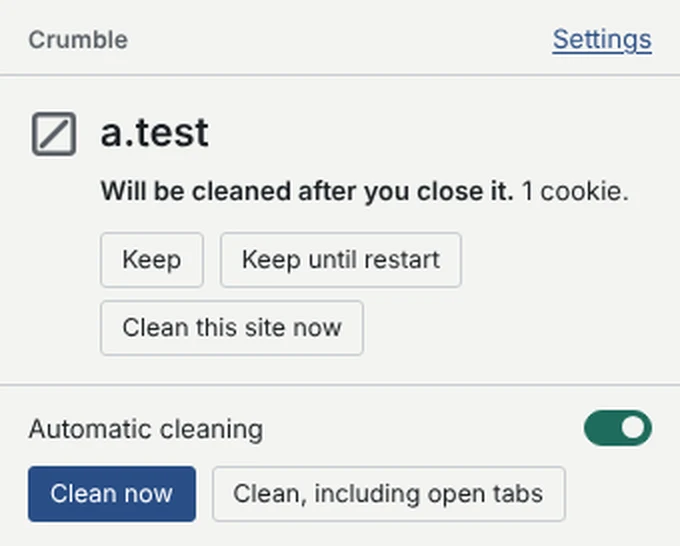
Crumble deletes a site's cookies and site data shortly after you close its last tab. The sites you choose to keep stay logged in.
- Close a tab, and the site forgets you. After a short delay (15 seconds by default) its cookies, LocalStorage, IndexedDB, Cache Storage and Service Workers are deleted, including third-party and partitioned cookies.
- Keep the sites you trust. Sites on Keep are never cleaned. Sites on Keep until restart stay until the browser next starts.
- Nothing leaves your browser. No account, no analytics, no servers. Undo restores the last cleanup's cookies for 2 minutes.
Also works in Brave, Vivaldi and Opera from the Chrome Web Store.
Questions
Is there a Cookie AutoDelete for Chrome now?
Cookie AutoDelete's Chrome listing was removed when Chrome ended Manifest V2. Crumble is an independent Manifest V3 extension that does the same job: it deletes cookies and site data when you close a tab, with the same Keep and Keep until restart lists and the same rule syntax. It is not affiliated with Cookie AutoDelete.
How do I move my Cookie AutoDelete whitelist?
In Cookie AutoDelete, export your expressions to a file. In Crumble, open Settings, Lists, Import rules (or step two of setup) and choose that file. The whitelist becomes Keep and the greylist becomes Keep until restart, with your cookie-name options. You see a preview before anything changes.
Does it delete partitioned (CHIPS) cookies?
Yes. Crumble reads cookies in every partition and deletes each partitioned cookie with its exact partition key, then checks that it is really gone. Many cleaners only see unpartitioned cookies.
Will it log me out of everything?
Not by surprise. Nothing is cleaned until you finish a short setup where you pick the sites to keep, and sites that are open in a tab are never cleaned automatically. Reopening a site within the delay keeps everything, and Undo restores the last cleanup's cookies for 2 minutes.
Why does it need access to all websites?
Chrome only lets an extension read and delete the cookies of sites it has access to. To clean any site you leave, Crumble needs access to all of them. It never reads or changes the pages you visit, injects nothing into them, and doesn't ask for your history.
Does it work on Edge, Brave and Vivaldi?
Yes. Crumble works in Chromium browsers: Chrome, Edge, Brave, Vivaldi and Opera. Install it from the Chrome Web Store, or from Edge Add-ons in Edge.
What's the difference between Keep and Keep until restart?
A site on Keep is never cleaned automatically. A site on Keep until restart keeps its data while the browser runs, and is cleaned the next time the browser starts. If a site matches both, Keep wins.